In this blog post, I am going to list the tools, libraries, scripts, and services that anyone responsible for a frontend application should be aware of.
Most of this site (HowToTestFrontend.com) focuses a lot on testing React. This blog post is a bit more framework agnostic and could be useful even if you don't use React.
Test Runners/Frameworks
This site is about learning how to write tests. I have to mention tests!
You should definitely be familiar with one of these for most of your regular unit and integration tests.
There are only really two options to consider nowadays:
- Jest
- Vitest (my recommendation - see my blog post on comparing Vitest to Jest)
For end-to-end tests there are also two main players:
- Cypress - more common in older apps
- Playwright (my recommendation) - most popular in newer apps
Visual Testing
You can use Percy to take screenshots and compare them. Then in your PRs, you have to manually approve changes.
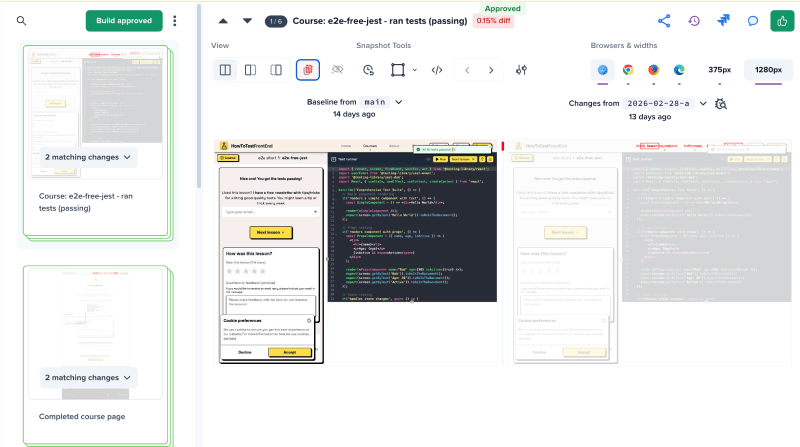
So if your sidebar suddenly stopped being on the left, your logo changed size, or your text colours were updated, you would have to manually approve these changes.
Visual regression testing catches a huge amount of bugs that are almost impossible to notice during regular pull-request review when looking only at code.
Storybook
Storybook is a very popular tool that lets you develop UI components in isolation from your app.
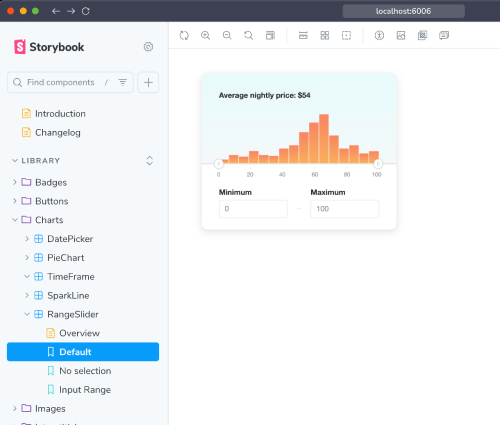
Useful for engineers, and also useful for product/design to see your existing components.
If you are building a UI heavy app, especially if you have multiple teams working on it then Storybook is a fantastic tool.
Link: Storybook
Formatting & Linting
- ESLint is the classic way to run linting. But oxlint is much faster, and I think this will be the standard that is used everywhere very soon.
- For formatting, Prettier used to be the standard - almost all JS based apps would use it. But within the last few months oxfmt has become very popular, mostly as it is much faster and almost completely Prettier-compatible.
Check Your Dependencies
Madge - for Circular Dependencies
Madge is a nice tool that can take an app and find all circular dependencies. This can help with debugging when you have issues building due to circular dependencies.
npx madge --circular --extensions ts ./
Skott to Visualise Your Dependencies
Skott is a tool that can be used to generate directed graphs from your JS app:
- Automatically collects metadata such as file size
- Third-party or builtin dependencies
- Detect circular dependencies
- Finding unused npm dependencies
Knip to Find Unused Dependencies
Knip finds and fixes unused dependencies, exports, and files. Use it for enhanced code and dependency management.
npx knip
Check Dependency Bundles
- Use the Bundlephobia site to see how big a dependency will be (example: lodash's merge )
Tools to Sync Your package.json to Your Lock File
If you have versions like ^1.2 in your package.json, the resolved version in your lock file may be different.
For security reasons (so you know exactly what can be installed) and to make it easier to know exactly what is installed without having to inspect the lock file, there are a few tools that you can run, depending on your package manager:
- pnpm - @kkirbatski/pnpm-locksmith
- yarn - @yarn-tool/yarnlock-diff (note: this does not have many downloads and isn't too popular)
Know How to Use "why"
If you have a large app with lots of dependencies, it might be confusing what libraries are installed. Some sub-dependencies will install their own versions of a package.
Use the why command in npm, yarn, and pnpm to find out what/why a version is installed:
# npm
npm why <package-name>

# yarn
yarn why <package-name>

# pnpm
pnpm why <package-name>
Bundle Visualisers
After running your yarn build command, it is quite rare to manually inspect the ./dist (or ./next/ etc.) directory. But you should check it out to see what is causing large file sizes and slow builds.
Of course, don't do this manually. The best tools to easily see what is taking up most of the size are visualisers:
- vite-bundle-analyzer for Vite
- Next.js Bundle Analyzer
- esbuild-analyzer tool (online)
- Webpack Bundle Analyzer
React Specific
- If you use React, you need the official React Dev Tools plugins
- The why-did-you-render tool can also be useful
Fake Data for Tests
Don't be manually writing fake data. Use something like @faker-js/faker to generate fake data. It cleans up your test files and often makes your tests clearer about what the intention is. (Read my blog post on why you should use Faker here)
Update Your package.json Dependencies
You can use npm-check-updates to upgrade your package.json dependencies to the latest versions, ignoring specified versions.
Compatible with npm, yarn, pnpm, deno, and bun.
Husky and Lint-staged
Use Husky to run git hooks (like pre-commit, pre-push) and lint-staged to only run linting/formatting on staged files.
Using both means you can get the linting/formatting on your changed files, but because of combining it with lint-staged, it will only run those checks on files changed in that commit.
Monorepo Tools
If you use a monorepo, then you should consider a monorepo tool such as:
- Turbo - easiest to set up, can increase speed
- Nx - better for larger and more complex monorepos, but harder to configure
Apps/Tools to Use on CI/CD
- Use Dependabot (on GitHub) or Renovate to automatically handle dependency updates and security issues in the dependencies
- Use Socket.dev to detect security vulnerabilities and supply chain risks in your dependencies. You can use this for free or paid
- Use Snyk to scan for vulnerabilities in dependencies and it can automatically fix PRs
Apps/Tools to Run Locally
Although this is more for backend than frontend, if you need to deal with webhooks then a few years ago everyone used ngrok .
Now using ngrok is often quite a lot of hassle unless you have a paid plan. Cloudflare Tunnels are often better now and easier to set up.
Other Tools Worth Knowing About
- Bundle-buddy to visualise the code that you are building
- Source-map-explorer to analyse and view space usage of your source maps
- RSC Explorer to visualise React Server Components