You can have 100% test coverage, all your tests passing and functionality wise, it might work fine - but it might look completely broken.
Typical unit, integration and end-to-end (E2E) tests will test functionality - what your app can do - such as rendering the correct text, interactions when you click a button, firing off API requests. But none of this checks how your app or components actually appear to users.
This is where visual regression testing can help you. It takes visual screenshots of your page or components, and compares them against a baseline image to check that nothing changed.
So if you update an SVG and change it from width="50" to width="100", it will catch it if this icon was used on another section of the site that you didn't think to manually check.
If they match: all good! If something changed visually, then it will be a test failure on your CI/CD workflow.
With tools like Percy , a visual change will normally be raised as a failure until you log in to Percy and approve the changes
Note: I am going to sound like I am promoting Percy. I have no affiliation with them. They just, in my opinion, have the best UI and tools for visual regression testing!
With the rise of AI-generated code changes, visual regression tests are going to become even more crucial so I really think more companies should get on board and start using them.
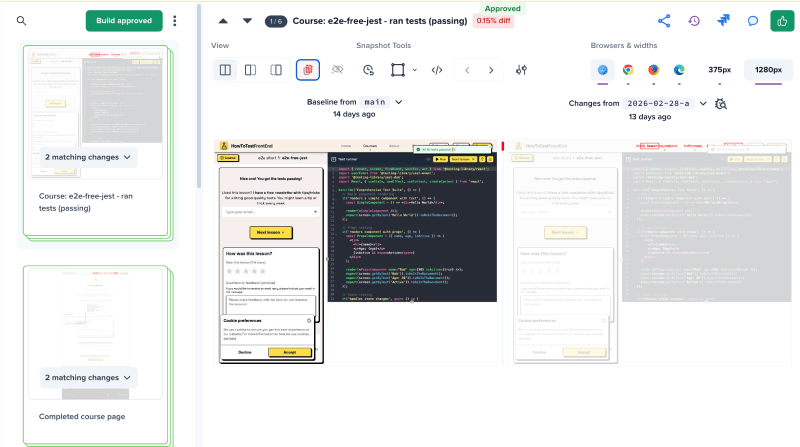
Here are a couple of examples. In Percy I am using the view where it shows the baseline version on the left, and my changes on the right.
In this one I changed the header area, so it spotted the difference and made me approve the changes:
And in this one I changed the list of articles on the left sidebar:
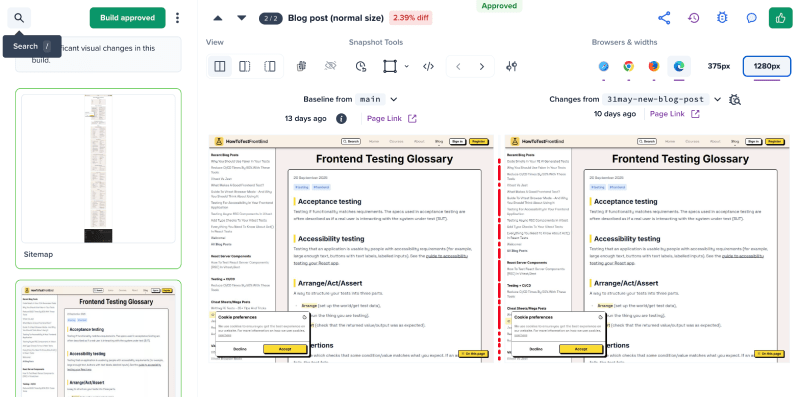
You can see in these screenshots I approved the changes - they were intentional. Of course the value in visual regression tests is when you accidentally change something without realising.
- Unit tests check behaviour
- Integration tests and E2E tests check behaviour & how it all works together
- API Contract tests check response types/shapess
- Visual regression tests check appearance
Why is visual regression testing important?
When you write tests (unit, integration or E2E) you are normally testing things like:
- input arguments (or props on a component)
- returned values (or what a component renders)
- and side effects like a
fetch()call orwindow.localStorageupdate
You could test CSS classnames (like expect(btn).toHaveClass('btn-primary')) but this is generally a code smell when it comes to testing as you're testing implementation details rather than user-facing behaviour.
Even if all your class names are correct, the actual visual appearance could still be broken due to things like CSS changes, CSS not loading correctly, specificity issues, or external stylesheets interfering.
Visual regression tests are the solution to this as it really does test what the user will see, and is not testing implementation details. (It won't matter if you're using Tailwind, BEM, styled-components or if you switch it around - all it cares about is how it renders).
How does it work?
There are a few ways to set it up, but broadly speaking the tools that you use for visual regression tests:
- render your component or page in a real browser, in a headless mode (this can run on your CI/CD platform, such as GitHub Actions)
- Quite often this will just be in your regular E2E tests (like Playwright or Cypress), and you pass the
pageobject to a function that will deal with taking the screenshot - In Vitest Browser Mode it has built in screenshot testing.
- Quite often this will just be in your regular E2E tests (like Playwright or Cypress), and you pass the
- This gets compared to your baseline snapshot.
- If any changes (and you're happy with those changes): you approve it.
- If you did not expect changes then you have to change your code and push another commit
- if there were no changes, then it will auto approve
- Once you merge your PR into your default branch (e.g.
main), then it will regenerate the screenshots and mark those new ones as the baseline ones
What gets tested and what kinds of bugs will it catch?
It can catch anything that might happen visually.
I would say the main things it catches are:
- You changed a component in one place, without realising the other places that component was used
- CSS changes (changes you made to your CSS, or other CSS with more specificity etc)
- Layout changes - overlapping content, position changes, etc
- Responsive issues (you can set them to take screenshots in different screen sizes)
- Different browser renders (take screenshots in Chrome, Firefox, Safari etc)
- Font or image loading issues (as they'll start showing up as a missing image)
It is also good at catching subtle bugs.
I remember years ago (I've been using visual regression tests since around 2018) updating one icon SVG which I believed was a super safe change, about to push to production... when a visual regression test caught the fact that the icon only rendered ok in one place - the 20 other places throughout the app was now rendering with the incorrect colour.
This would have been impossible to catch with regular tests, and would have meant a lot of manual testing (or remembering/checking every place the icon was used).
What tools can you use for visual regression testing?
There are three main contenders.
- Percy is probably the most popular with bigger companies. It has a good free tier, but it can get expensive quickly if you take too many screenshots. Percy is great for full page screenshot tests. It is compatible with a lot of tools (like Playwright, Puppeteer, Cypress, etc)
- Chromatic from Storybook also has ways to take screenshots of components. They have a good free tier.
- And the latest addition to the big players is Vitest Browser Mode which has visual regression screenshot testing built in.
How does visual regression testing fit into your CI/CD pipeline?
Like I said above, it can normally slot in to your E2E tests.
For Percy with an E2E tool like Playwright, it is really simple:
import { expect, test } from '@playwright/test';
import percySnapshot from '@percy/playwright';

test('take a screenshot', async ({ page }) => {
  // regular Playwright code:
  await page.goto('http://localhost:3000');
  await expect(page.getByText('hello world')).toBeVisible();

  // then just pass the page object in, with a screenshot title:
  await percySnapshot(page, 'homepage screenshot');
});
For Chromatic, they take screenshots of your Storybook components. It is more like a config that you just turn on.
But you can also do it in your E2E test like Playwright, in a very similar way to Percy:
import { test, takeSnapshot } from '@chromatic-com/playwright';

test('Can filter product', async ({ page }, testInfo) => {
  // regular Playwright test:
  await page.goto('/restaurant/dp/B07KMG72');
  await page.locator('.menu__item:first-of-type').click();

  // take your screenshot:
  await takeSnapshot(page, testInfo);
});
Vitest Browser Mode can take screenshots of your components. It is less of a full product (like Percy or Chromatic) so they don't have a web interface to manually approve or handle things as smoothly (like Percy or Chromatic do).
import { expect, test } from 'vitest';
import { page } from 'vitest/browser';

test('hero section looks correct', async () => {
  // ...the rest of the test

  // capture and compare screenshot
  await expect(page.getByTestId('hero')).toMatchScreenshot('hero-section');
});
Common issues and how to avoid them
Flaky visual regression tests mean that you end up wasting time having to manually approve 'changes' that are not real.
I would say that taking screenshots does add a bit of extra maintenance if you are not careful. Especially if you start taking entire page screenshots (like you would in E2E tests). If you take screenshots via Vitest Browser Mode (which will probably be a single component) then it is less common to have flaky tests due to animations or things not loading.
For example if you take a screenshot too quickly, maybe the fonts load sometimes but don't load other times - so almost every screenshot is alternating between fonts which of course shows up as a different screenshot so you have to manually approve it.
To avoid this you always want to ensure the page has fully loaded before taking your screenshots.
Animations can also cause issues. If you have some animation like a marquee, it is very unlikely every screenshot will be at the exact same point of the animation. To get around this it is best to use CSS to hide the marquee from your visual regression tool (most of the libraries have a way to do this). In Percy you can even hide an area via their visual editor (just drag a box around areas of the page you don't want to compare screenshots for - such as a header area with a different date each day!)
That brings me to the next thing that causes false failing tests - dynamic data.
If you are testing a site which has the date, or something like "Last blog post: 5 days ago" then this is of course going to change very often between your screenshots so it will show up as a failure that you have to manually approve. The workaround is to, like with animations, hide it from your visual regression screenshot tools - again this is easy to set up.
Another issue can come up when you're testing huge pages with far too much going on. It is often best to be selective about which pages you test with.
How to get started
It really depends on what your current testing stack looks like.
If you use Vitest Browser Mode tests, try their built in visual regression tests , although the DX (and lack of UI) is not ideal. (see full course here on Vitest Browser Mode)
If you use Storybook already, especially if you publish them to Chromatic (which is free to do), you can easily set it up to take screenshots of your components . They have a decent free tier.
If you have E2E tests in Playwright or Cypress, or use something like Puppeteer, then Percy will probably be easiest to set up.
Any questions?
Reach out with any questions. I will definitely do a more in depth deep-dive into the various ways of doing these sorts of visual regression tests if there is any interest.
I personally am a huge fan of it, just because it has caught dumb bugs I've introduced over the years.